
 Dogtiti
d33e772fa5
feat: voice print
Dogtiti
d33e772fa5
feat: voice print
|
пре 1 година | |
|---|---|---|
| .github | пре 1 година | |
| .husky | пре 3 година | |
| app | пре 1 година | |
| docs | пре 1 година | |
| public | пре 1 година | |
| scripts | пре 1 година | |
| src-tauri | пре 1 година | |
| test | пре 1 година | |
| .babelrc | пре 2 година | |
| .dockerignore | пре 2 година | |
| .env.template | пре 1 година | |
| .eslintignore | пре 3 година | |
| .eslintrc.json | пре 1 година | |
| .gitignore | пре 1 година | |
| .gitpod.yml | пре 3 година | |
| .lintstagedrc.json | пре 3 година | |
| .prettierrc.js | пре 3 година | |
| CODE_OF_CONDUCT.md | пре 3 година | |
| Dockerfile | пре 2 година | |
| LICENSE | пре 2 година | |
| README.md | пре 1 година | |
| README_CN.md | пре 1 година | |
| README_JA.md | пре 1 година | |
| docker-compose.yml | пре 2 година | |
| jest.config.ts | пре 1 година | |
| jest.setup.ts | пре 1 година | |
| next.config.mjs | пре 1 година | |
| package.json | пре 1 година | |
| tsconfig.json | пре 3 година | |
| vercel.json | пре 2 година | |
| yarn.lock | пре 1 година |
README.md

NextChat (ChatGPT Next Web)
English / [简体中文](./README_CN.md) One-Click to get a well-designed cross-platform ChatGPT web UI, with GPT3, GPT4 & Gemini Pro support. 一键免费部署你的跨平台私人 ChatGPT 应用, 支持 GPT3, GPT4 & Gemini Pro 模型。 [![Saas][Saas-image]][saas-url] [![Web][Web-image]][web-url] [![Windows][Windows-image]][download-url] [![MacOS][MacOS-image]][download-url] [![Linux][Linux-image]][download-url] [NextChatAI](https://nextchat.dev/chat?utm_source=readme) / [Web App](https://app.nextchat.dev) / [Desktop App](https://github.com/Yidadaa/ChatGPT-Next-Web/releases) / [Discord](https://discord.gg/YCkeafCafC) / [Enterprise Edition](#enterprise-edition) / [Twitter](https://twitter.com/NextChatDev) [NextChatAI](https://nextchat.dev/chat) / [网页版](https://app.nextchat.dev) / [客户端](https://github.com/Yidadaa/ChatGPT-Next-Web/releases) / [企业版](#%E4%BC%81%E4%B8%9A%E7%89%88) / [反馈](https://github.com/Yidadaa/ChatGPT-Next-Web/issues) [ ](https://zeabur.com/templates/ZBUEFA) [
 ](https://gitpod.io/#https://github.com/Yidadaa/ChatGPT-Next-Web) [
 ](https://www.bt.cn/new/download.html) [
 ](https://computenest.aliyun.com/market/service-
f1c9b75e59)
[Enterprise Edition
Meeting Your Company's Privatization and Customization Deployment Requirements:
- Brand Customization: Tailored VI/UI to seamlessly align with your corporate brand image.
- Resource Integration: Unified configuration and management of dozens of AI resources by company administrators, ready for use by team members.
- Permission Control: Clearly defined member permissions, resource permissions, and knowledge base permissions, all controlled via a corporate-grade Admin Panel.
- Knowledge Integration: Combining your internal knowledge base with AI capabilities, making it more relevant to your company's specific business needs compared to general AI.
- Security Auditing: Automatically intercept sensitive inquiries and trace all historical conversation records, ensuring AI adherence to corporate information security standards.
- Private Deployment: Enterprise-level private deployment supporting various mainstream private cloud solutions, ensuring data security and privacy protection.
- Continuous Updates: Ongoing updates and upgrades in cutting-edge capabilities like multimodal AI, ensuring consistent innovation and advancement.
For enterprise inquiries, please contact: business@nextchat.dev
企业版
满足企业用户私有化部署和个性化定制需求:
- 品牌定制:企业量身定制 VI/UI,与企业品牌形象无缝契合
- 资源集成:由企业管理人员统一配置和管理数十种 AI 资源,团队成员开箱即用
- 权限管理:成员权限、资源权限、知识库权限层级分明,企业级 Admin Panel 统一控制
- 知识接入:企业内部知识库与 AI 能力相结合,比通用 AI 更贴近企业自身业务需求
- 安全审计:自动拦截敏感提问,支持追溯全部历史对话记录,让 AI 也能遵循企业信息安全规范
- 私有部署:企业级私有部署,支持各类主流私有云部署,确保数据安全和隐私保护
- 持续更新:提供多模态、智能体等前沿能力持续更新升级服务,常用常新、持续先进
企业版咨询: business@nextchat.dev
Features
- Deploy for free with one-click on Vercel in under 1 minute
- Compact client (~5MB) on Linux/Windows/MacOS, download it now
- Fully compatible with self-deployed LLMs, recommended for use with RWKV-Runner or LocalAI
- Privacy first, all data is stored locally in the browser
- Markdown support: LaTex, mermaid, code highlight, etc.
- Responsive design, dark mode and PWA
- Fast first screen loading speed (~100kb), support streaming response
- New in v2: create, share and debug your chat tools with prompt templates (mask)
- Awesome prompts powered by awesome-chatgpt-prompts-zh and awesome-chatgpt-prompts
- Automatically compresses chat history to support long conversations while also saving your tokens
- I18n: English, 简体中文, 繁体中文, 日本語, Français, Español, Italiano, Türkçe, Deutsch, Tiếng Việt, Русский, Čeština, 한국어, Indonesia
Roadmap
- System Prompt: pin a user defined prompt as system prompt #138
- User Prompt: user can edit and save custom prompts to prompt list
- Prompt Template: create a new chat with pre-defined in-context prompts #993
- Share as image, share to ShareGPT #1741
- Desktop App with tauri
- Self-host Model: Fully compatible with RWKV-Runner, as well as server deployment of LocalAI: llama/gpt4all/rwkv/vicuna/koala/gpt4all-j/cerebras/falcon/dolly etc.
- Artifacts: Easily preview, copy and share generated content/webpages through a separate window #5092
- Plugins: support network search, calculator, any other apis etc. #165 #5353
- local knowledge base
What's New
- 🚀 v2.15.4 The Application supports using Tauri fetch LLM API, MORE SECURITY! #5379
- 🚀 v2.15.0 Now supports Plugins! Read this: NextChat-Awesome-Plugins
- 🚀 v2.14.0 Now supports Artifacts & SD
- 🚀 v2.10.1 support Google Gemini Pro model.
- 🚀 v2.9.11 you can use azure endpoint now.
- 🚀 v2.8 now we have a client that runs across all platforms!
- 🚀 v2.7 let's share conversations as image, or share to ShareGPT!
- 🚀 v2.0 is released, now you can create prompt templates, turn your ideas into reality! Read this: ChatGPT Prompt Engineering Tips: Zero, One and Few Shot Prompting.
主要功能
- 在 1 分钟内使用 Vercel 免费一键部署
- 提供体积极小(~5MB)的跨平台客户端(Linux/Windows/MacOS), 下载地址
- 完整的 Markdown 支持:LaTex 公式、Mermaid 流程图、代码高亮等等
- 精心设计的 UI,响应式设计,支持深色模式,支持 PWA
- 极快的首屏加载速度(~100kb),支持流式响应
- 隐私安全,所有数据保存在用户浏览器本地
- 预制角色功能(面具),方便地创建、分享和调试你的个性化对话
- 海量的内置 prompt 列表,来自中文和英文
- 自动压缩上下文聊天记录,在节省 Token 的同时支持超长对话
- 多国语言支持:English, 简体中文, 繁体中文, 日本語, Español, Italiano, Türkçe, Deutsch, Tiếng Việt, Русский, Čeština, 한국어, Indonesia
- 拥有自己的域名?好上加好,绑定后即可在任何地方无障碍快速访问
开发计划
- 为每个对话设置系统 Prompt #138
- 允许用户自行编辑内置 Prompt 列表
- 预制角色:使用预制角色快速定制新对话 #993
- 分享为图片,分享到 ShareGPT 链接 #1741
- 使用 tauri 打包桌面应用
- 支持自部署的大语言模型:开箱即用 RWKV-Runner ,服务端部署 LocalAI 项目 llama / gpt4all / rwkv / vicuna / koala / gpt4all-j / cerebras / falcon / dolly 等等,或者使用 api-for-open-llm
- Artifacts: 通过独立窗口,轻松预览、复制和分享生成的内容/可交互网页 #5092
- 插件机制,支持
联网搜索、计算器、调用其他平台 api #165 #5353
最新动态
- 🚀 v2.15.4 客户端支持Tauri本地直接调用大模型API,更安全!#5379
- 🚀 v2.15.0 现在支持插件功能了!了解更多:NextChat-Awesome-Plugins
- 🚀 v2.14.0 现在支持 Artifacts & SD 了。
- 🚀 v2.10.1 现在支持 Gemini Pro 模型。
- 🚀 v2.9.11 现在可以使用自定义 Azure 服务了。
- 🚀 v2.8 发布了横跨 Linux/Windows/MacOS 的体积极小的客户端。
- 🚀 v2.7 现在可以将会话分享为图片了,也可以分享到 ShareGPT 的在线链接。
- 🚀 v2.0 已经发布,现在你可以使用面具功能快速创建预制对话了! 了解更多: ChatGPT 提示词高阶技能:零次、一次和少样本提示。
- 💡 想要更方便地随时随地使用本项目?可以试下这款桌面插件:https://github.com/mushan0x0/AI0x0.com
Get Started
- Get OpenAI API Key;
- Click
, remember that
CODEis your page password; - Enjoy :)
FAQ
Keep Updated
If you have deployed your own project with just one click following the steps above, you may encounter the issue of "Updates Available" constantly showing up. This is because Vercel will create a new project for you by default instead of forking this project, resulting in the inability to detect updates correctly.
We recommend that you follow the steps below to re-deploy:
- Delete the original repository;
- Use the fork button in the upper right corner of the page to fork this project;
- Choose and deploy in Vercel again, please see the detailed tutorial.
Enable Automatic Updates
If you encounter a failure of Upstream Sync execution, please manually update code.
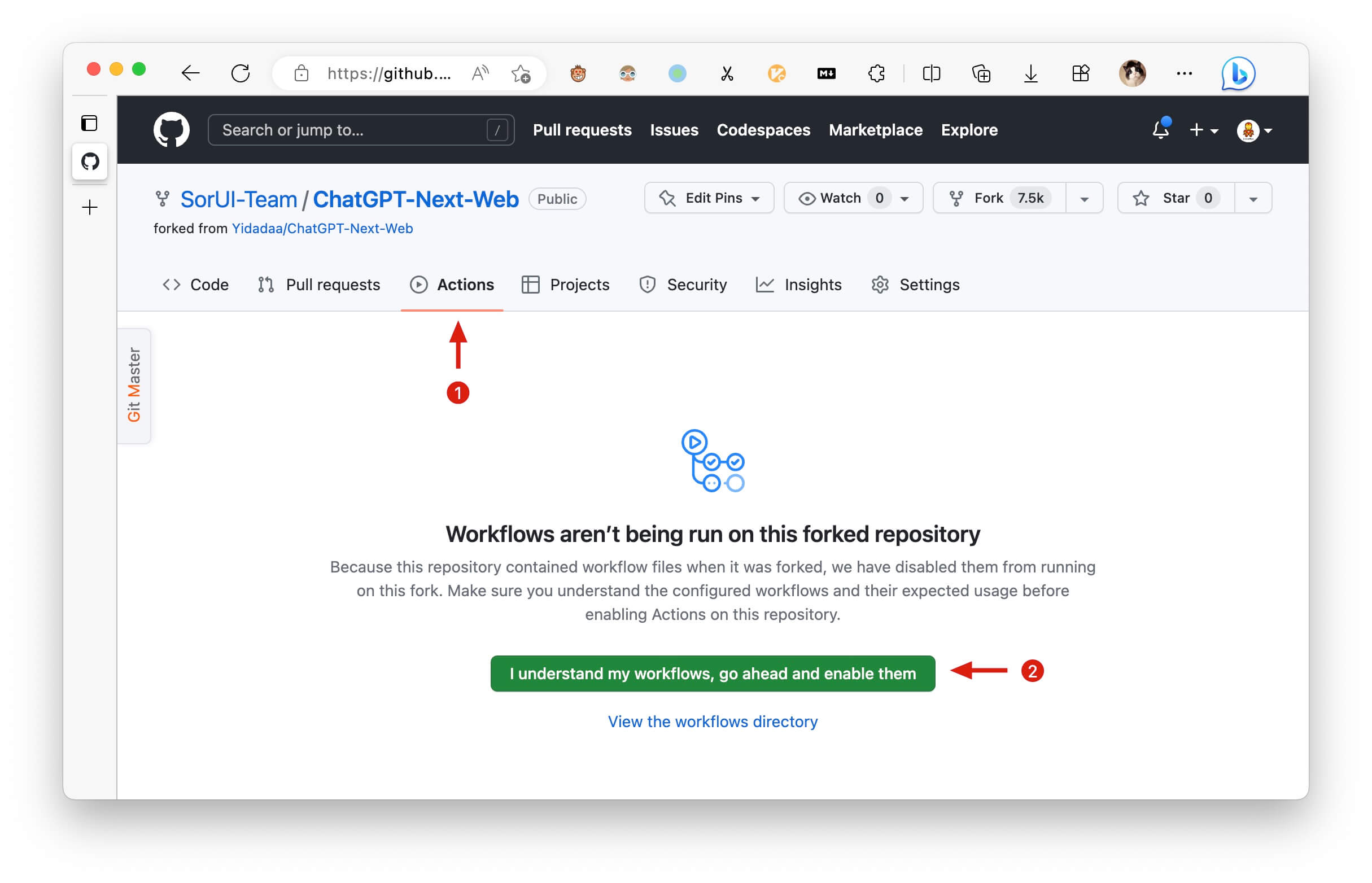
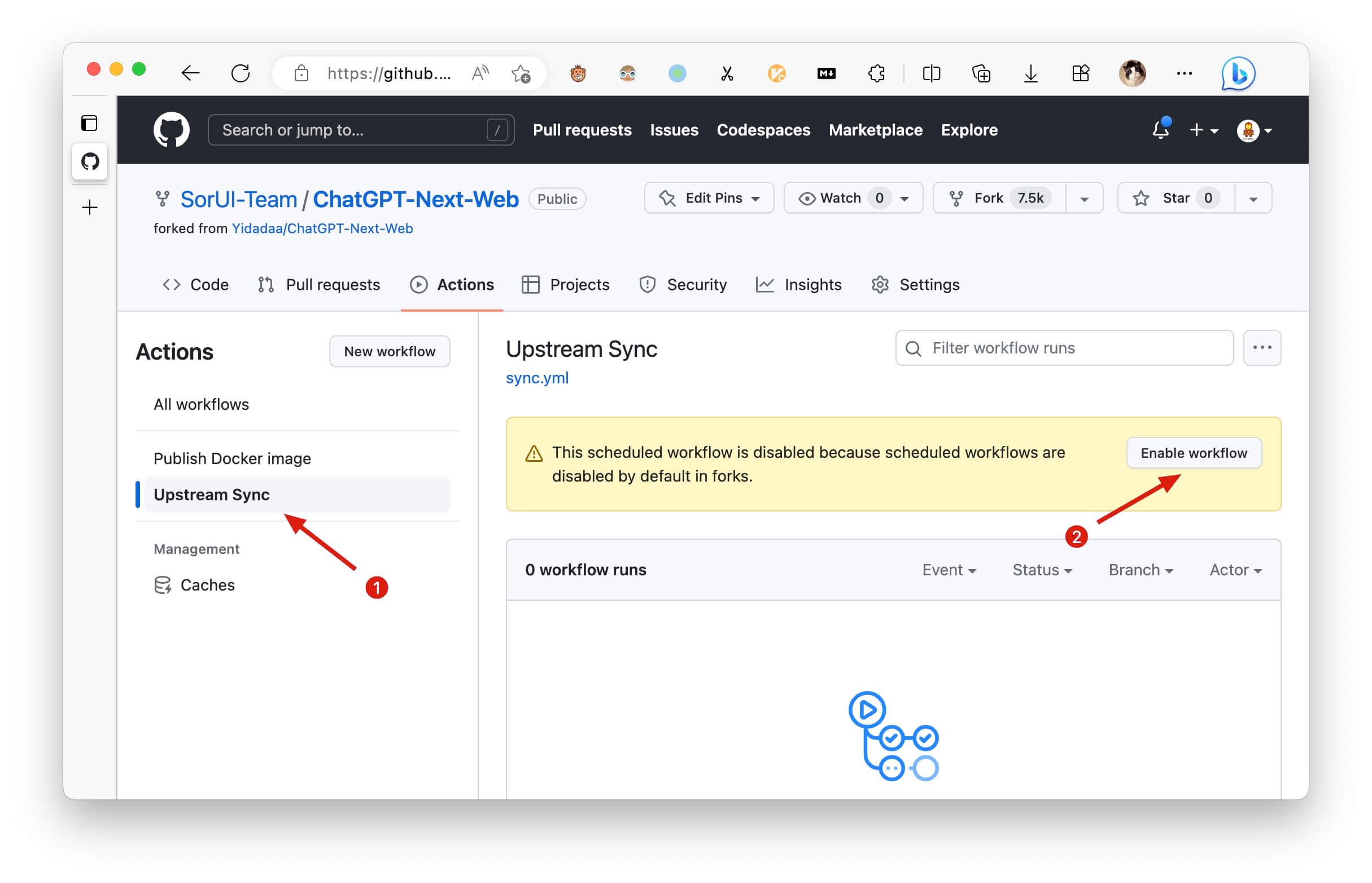
After forking the project, due to the limitations imposed by GitHub, you need to manually enable Workflows and Upstream Sync Action on the Actions page of the forked project. Once enabled, automatic updates will be scheduled every hour:
Manually Updating Code
If you want to update instantly, you can check out the GitHub documentation to learn how to synchronize a forked project with upstream code.
You can star or watch this project or follow author to get release notifications in time.
Access Password
This project provides limited access control. Please add an environment variable named CODE on the vercel environment variables page. The value should be passwords separated by comma like this:
code1,code2,code3
After adding or modifying this environment variable, please redeploy the project for the changes to take effect.
Environment Variables
CODE (optional)
Access password, separated by comma.
OPENAI_API_KEY (required)
Your openai api key, join multiple api keys with comma.
BASE_URL (optional)
Default:
https://api.openai.comExamples:
http://your-openai-proxy.com
Override openai api request base url.
OPENAI_ORG_ID (optional)
Specify OpenAI organization ID.
AZURE_URL (optional)
Example: https://{azure-resource-url}/openai
Azure deploy url.
AZURE_API_KEY (optional)
Azure Api Key.
AZURE_API_VERSION (optional)
Azure Api Version, find it at Azure Documentation.
GOOGLE_API_KEY (optional)
Google Gemini Pro Api Key.
GOOGLE_URL (optional)
Google Gemini Pro Api Url.
ANTHROPIC_API_KEY (optional)
anthropic claude Api Key.
ANTHROPIC_API_VERSION (optional)
anthropic claude Api version.
ANTHROPIC_URL (optional)
anthropic claude Api Url.
BAIDU_API_KEY (optional)
Baidu Api Key.
BAIDU_SECRET_KEY (optional)
Baidu Secret Key.
BAIDU_URL (optional)
Baidu Api Url.
BYTEDANCE_API_KEY (optional)
ByteDance Api Key.
BYTEDANCE_URL (optional)
ByteDance Api Url.
ALIBABA_API_KEY (optional)
Alibaba Cloud Api Key.
ALIBABA_URL (optional)
Alibaba Cloud Api Url.
IFLYTEK_URL (Optional)
iflytek Api Url.
IFLYTEK_API_KEY (Optional)
iflytek Api Key.
IFLYTEK_API_SECRET (Optional)
iflytek Api Secret.
CHATGLM_API_KEY (optional)
ChatGLM Api Key.
CHATGLM_URL (optional)
ChatGLM Api Url.
HIDE_USER_API_KEY (optional)
Default: Empty
If you do not want users to input their own API key, set this value to 1.
DISABLE_GPT4 (optional)
Default: Empty
If you do not want users to use GPT-4, set this value to 1.
ENABLE_BALANCE_QUERY (optional)
Default: Empty
If you do want users to query balance, set this value to 1.
DISABLE_FAST_LINK (optional)
Default: Empty
If you want to disable parse settings from url, set this to 1.
CUSTOM_MODELS (optional)
Default: Empty Example:
+llama,+claude-2,-gpt-3.5-turbo,gpt-4-1106-preview=gpt-4-turbomeans addllama, claude-2to model list, and removegpt-3.5-turbofrom list, and displaygpt-4-1106-previewasgpt-4-turbo.
To control custom models, use + to add a custom model, use - to hide a model, use name=displayName to customize model name, separated by comma.
User -all to disable all default models, +all to enable all default models.
For Azure: use modelName@Azure=deploymentName to customize model name and deployment name.
Example:
+gpt-3.5-turbo@Azure=gpt35will show optiongpt35(Azure)in model list. If you only can use Azure model,-all,+gpt-3.5-turbo@Azure=gpt35willgpt35(Azure)the only option in model list.
For ByteDance: use modelName@bytedance=deploymentName to customize model name and deployment name.
Example:
+Doubao-lite-4k@bytedance=ep-xxxxx-xxxwill show optionDoubao-lite-4k(ByteDance)in model list.
DEFAULT_MODEL (optional)
Change default model
WHITE_WEBDAV_ENDPOINTS (optional)
You can use this option if you want to increase the number of webdav service addresses you are allowed to access, as required by the format:
- Each address must be a complete endpoint
>
https://xxxx/yyy - Multiple addresses are connected by ', '
DEFAULT_INPUT_TEMPLATE (optional)
Customize the default template used to initialize the User Input Preprocessing configuration item in Settings.
STABILITY_API_KEY (optional)
Stability API key.
STABILITY_URL (optional)
Customize Stability API url.
Requirements
NodeJS >= 18, Docker >= 20
Development
Before starting development, you must create a new .env.local file at project root, and place your api key into it:
OPENAI_API_KEY=<your api key here>

# if you are not able to access openai service, use this BASE_URL
BASE_URL=https://chatgpt1.nextweb.fun/api/proxy
Local Development
# 1. install nodejs and yarn first
# 2. config local env vars in `.env.local`
# 3. run
yarn install
yarn dev
Deployment
BT Install
Docker (Recommended)
docker pull yidadaa/chatgpt-next-web

docker run -d -p 3000:3000 \
   -e OPENAI_API_KEY=sk-xxxx \
   -e CODE=your-password \
   yidadaa/chatgpt-next-web
You can start service behind a proxy:
docker run -d -p 3000:3000 \
   -e OPENAI_API_KEY=sk-xxxx \
   -e CODE=your-password \
   -e PROXY_URL=http://localhost:7890 \
   yidadaa/chatgpt-next-web
If your proxy needs password, use:
-e PROXY_URL="http://127.0.0.1:7890 user pass"
Shell
bash <(curl -s https://raw.githubusercontent.com/Yidadaa/ChatGPT-Next-Web/main/scripts/setup.sh)
Synchronizing Chat Records (UpStash)
| 简体中文 | English | Italiano | 日本語 | 한국어
Documentation
Please go to the [docs][./docs] directory for more documentation instructions.
- Deploy with cloudflare (Deprecated)
- Frequent Ask Questions
- How to add a new translation
- How to use Vercel (No English)
- User Manual (Only Chinese, WIP)
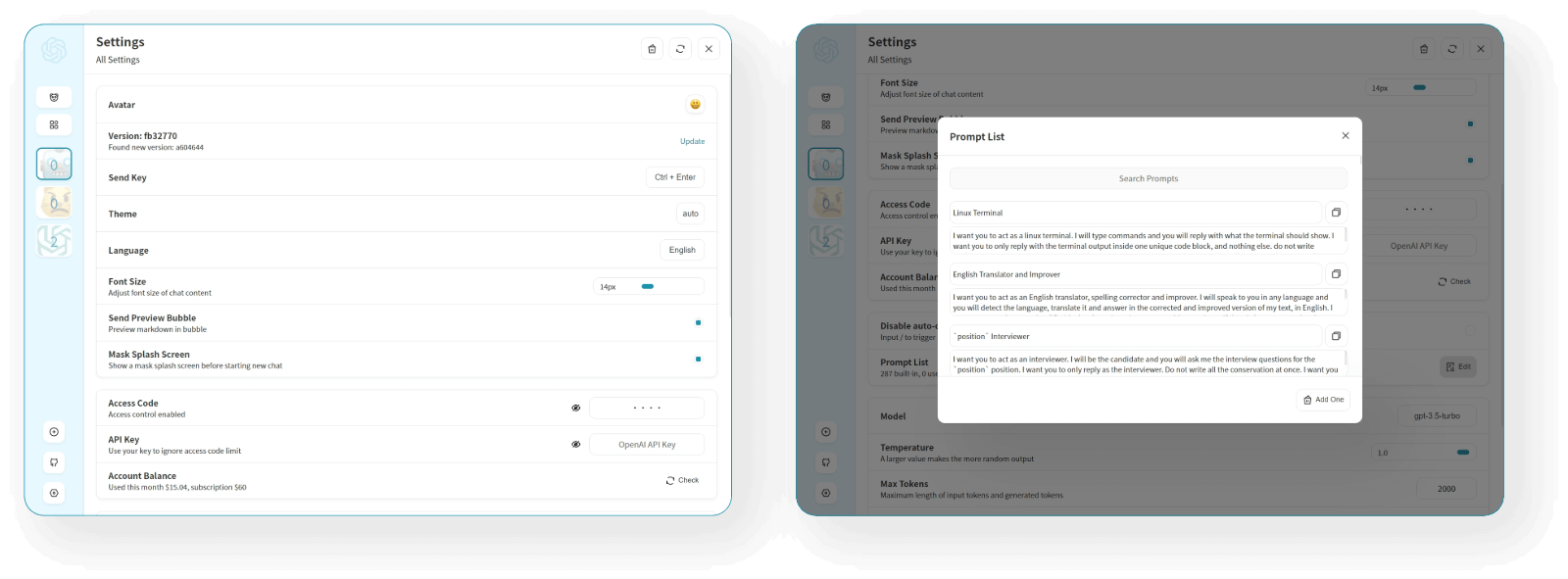
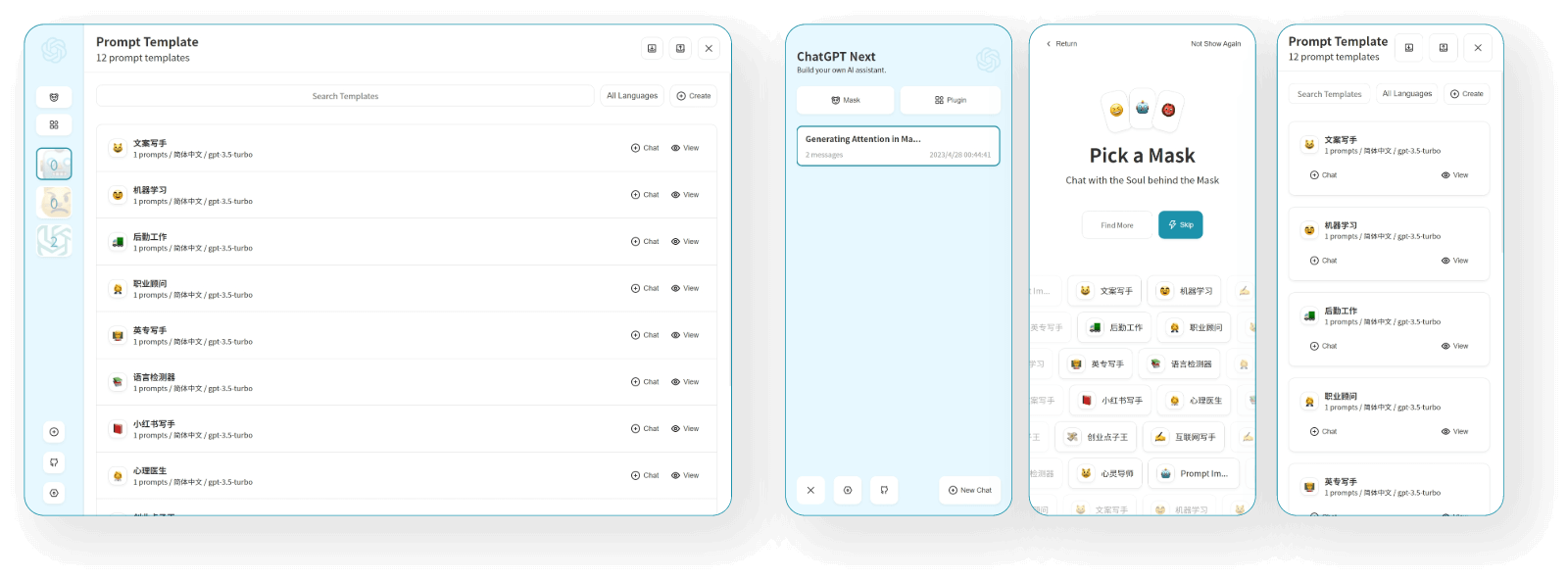
Screenshots
Translation
If you want to add a new translation, read this document.
Donation
Special Thanks
Sponsor
仅列出捐赠金额 >= 100RMB 的用户。
@mushan0x0 @ClarenceDan @zhangjia @hoochanlon @relativequantum @desenmeng @webees @chazzhou @hauy @Corwin006 @yankunsong @ypwhs @fxxxchao @hotic @WingCH @jtung4 @micozhu @jhansion @Sha1rholder @AnsonHyq @synwith @piksonGit @ouyangzhiping @wenjiavv @LeXwDeX @Licoy @shangmin2009
Contributors